


Table of Contents

NationBuilder paths are the backbone of a structured volunteer recruitment process, turning what often feels chaotic into something clear and trackable. The winding, traffic-jammed roads in my city remind me of volunteer recruitment—unplanned, confusing, and seemingly never-ending—but NationBuilder paths give you defined steps so you always know where each supporter stands. If you’ve ever felt lost trying to manage volunteers across spreadsheets, inboxes, and scattered notes, nationbuilder paths can help you bring order to the chaos and guide people from initial interest to active participation.
NationBuilder defines paths as a way of “taking people along a ladder of engagement to meet an end goal”. The goal here is to recruit volunteers, active volunteers who’ve proved their passion for the cause, have undergone a screening process, and participated in at least a single event.
tl;dr?
This guide will walk you through the ins and outs of using CallHub and nationbuilder paths for volunteer recruitment. You’ll learn how to set up, implement, and optimize your process for better results.
What Are NationBuilder paths to ‘become a volunteer’ ?
NationBuilder paths are structured workflows that the NationBuilder ‘Become a volunteer’ path takes prospective volunteers through seven planned steps before they become active in your organization. Each step is mapped out, with responsibilities assigned to specific control panel users. For example, one staffer might handle canvassing volunteers, while another manages phone banking volunteers.
Using NationBuilder paths for volunteer recruitment offers several advantages:
Structure and tracking: Bring order to a process that often feels chaotic, ensuring every step is accounted for.
Better targeting: Segment your universe of prospective volunteers and target based on skills, reminders, and more.
Delegate responsibilities: Assign tasks to specific staff or volunteers, making the process more manageable.
Read Also: What is phone banking? A simple guide to get you started
Getting started: Foundations for your volunteer path
Before you dive into using NationBuilder paths for volunteer recruitment, keep these points in mind:
- Create a volunteer signup page on your website. List available roles and include fields for mobile number, email, and specific interests. – Here is a sample view for you.
- Set up a ‘Become a volunteer’ path (or modify the default volunteer path in NationBuilder) with the steps outlined below.
- Create a goal to measure path completions, so you can track your progress.
Your ‘Become a volunteer’ path should include these steps:
- Potential volunteer
- Ask to volunteer
- Follow-up ask
- Signed up to volunteer
- Confirm suitability for the role
- Propose a volunteer date
- Attended a volunteer event
Setting up these steps in NationBuilder paths helps you track each volunteer’s journey and ensures no one falls through the cracks.
Before you launch your first CallHub campaign, set up the basics in NationBuilder so your paths actually drive volunteer
Read Also: The Only Volunteer Recruitment Script Sample You Need
How NationBuilder paths works
You start with a target universe of prospective volunteers. The first step is to ask them if they’d like to volunteer. Outreach campaigns follow, connecting with those who haven’t decided or couldn’t be reached. Meanwhile, your volunteer signup page collects new prospects.
Both sources feed leads into the next step, where you confirm each person’s suitability for a role. If they’re a good fit, they stay on your list until you need their skills. Once a volunteer participates in an event, they’re added to your database as a confirmed volunteer.
Throughout this process, NationBuilder paths help track each supporter’s progress, making it easy to see where everyone stands and what actions are needed next.
Step-by-Step: Multi-Channel Volunteer Recruitment Workflow
Here’s how to combine NationBuilder paths, CallHub, and telephony for maximum impact:
1. Build your list and make first contact
Identify supporters from your nation (ideally supporter levels 1 & 2) and add them to the ‘Potential volunteer’ step in your ‘Become a volunteer’ path. Move them to the ‘Ask to volunteer’ step, where you’ll reach out to see if and how they’d like to help.
Peer-to-peer text messaging is effective if you have mobile numbers. For landlines, use phone calls. If you’re using texting or calls, connect your nation to an outreach tool like CallHub. Set up NationBuilder paths so supporter status updates automatically based on their responses.
2. NationBuilder paths: Try CallHub for free
[caldera_form id=”CF5a9008b3a749a”]
Embed your NationBuilder lists and surveys into CallHub so you can run integrated calling and texting campaigns directly off your nationbuilder paths and sync data back in real-time. With this setup, every contact and survey response can automatically progress people along the right step in your “Become a volunteer” path.
3. Create NationBuilder paths and surveys
When you use NationBuilder to create surveys and paths, you can automate much of the recruitment process. Here’s how:
| How to create a NationBuilder survey with paths Step 1: Create a new NationBuilder survey (People > More > Surveys > +New Survey). When adding responses for a survey question you can see an ‘Add to path’ option. For each response, choose the appropriate ‘path’ and the adjoining ‘step’. Tip 1: Add a tag for each survey response to help you segment volunteers based on skills. eg. Tag people who choose ‘canvassing’ with ‘prospect_canvassing_volunteer.’ Tip 2: You can assign people who respond with a certain answer to a specific control panel user. Eg. Prospective volunteers showing interest in Canvassing are assigned to the volunteer in charge of canvassing. How to create a NationBuilder survey? Step 2: Add the survey to your website. Choose your website from the Dashboard and create a new Survey page. Add your created survey to the page in the ‘Survey Settings’ section. NationBuilder paths and surveys work together to streamline volunteer recruitment, making it easier to track and manage every step. |
4. Contact volunteers
Run your outreach campaign (asking to volunteer) on CallHub to the list of targeted supporters. Your agents (staff or volunteers who make contact with prospects) mark supporter responses during calling or peer-to-peer texting campaigns. Supporters who show interest are tagged with their skill and moved to the ‘Confirm suitability for role’ step in your NationBuilder path.
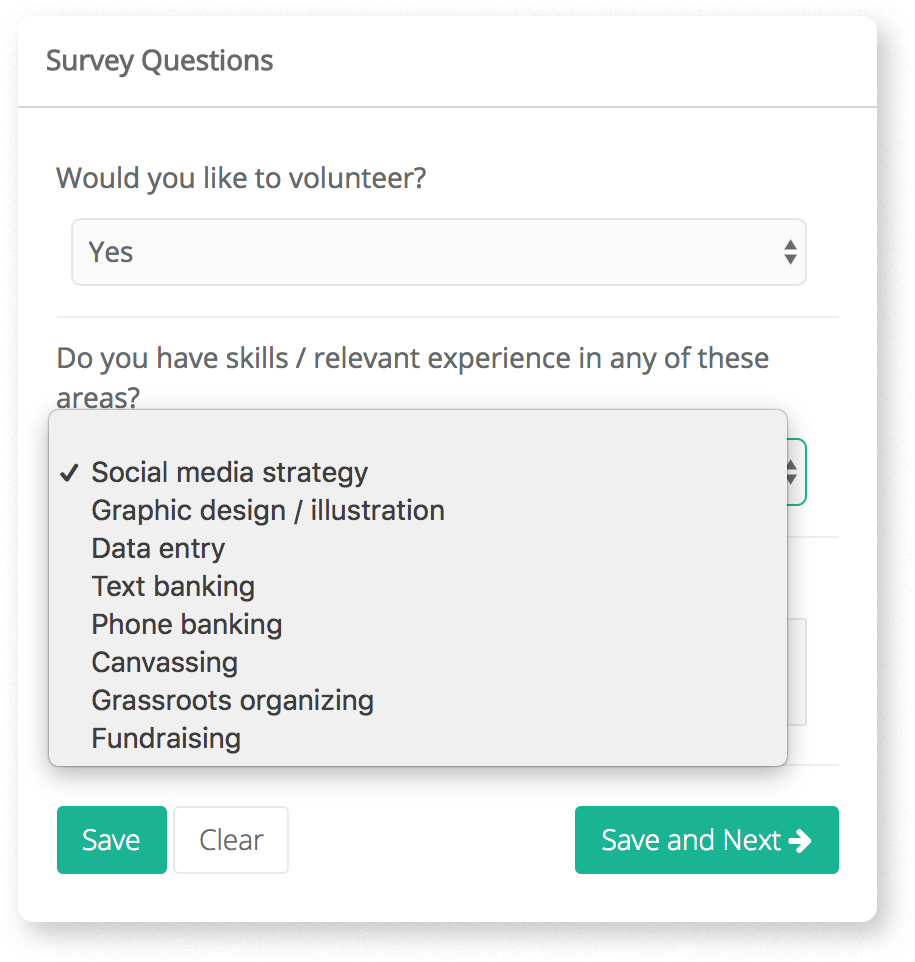
Some supporters you contact will not agree to volunteer. Some will flat out refuse, while others will ask for time to think about it. For those who haven’t made up their mind about volunteering, move them to the ‘Follow-up asks ‘ step for future outreach.
Another way to grow your list of volunteers is through volunteer sign-up forms on your website. A NationBuilder form like this one by United Oregon can be used to capture contact details and volunteer interests/skills. As with the previous outreach, tag the supporters filling in your volunteer sign-up form and move them to the ‘Signed up to volunteer’ step.
Read Also: What is Peer-to-Peer Texting? Complete 2025 Guide
5. Confirm a volunteer’s suitability for the role
The next step is to confirm that supporters who showed interest in your organization or cause are suited to the role. Phone conversations are apt for this stage of recruitment since live conversations are better at helping you gauge a person’s motivation and interests.
Move the prospects who signed up from the ‘Signed up to volunteer’ step to the ‘Confirm suitability for step. Control panel users can filter people from the ‘Confirm suitability for step based on their initial interest.
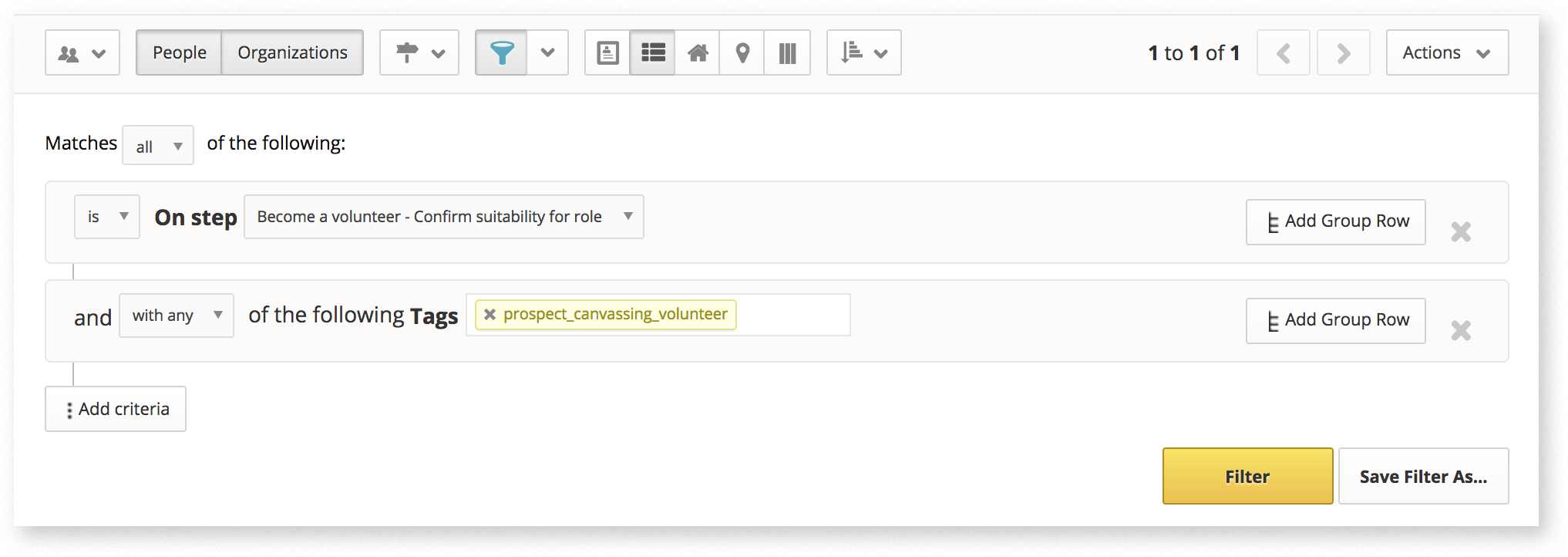
Add these people to a list and reach out to them through CallHub. Again, you can bring in a NationBuilder survey into CallHub to record their suitability and update their position in the path.
For example:
Question: Is this supporter suitable for the role?
- Option 1: Yes
- Option 2: No
Everyone for whom you mark the response as ‘Yes’ can be automatically updated to the ‘Propose volunteer step. (see: How to create a NationBuilder survey with paths)
| Tip: Not everyone you call will pick up their phone. But keep in mind that these are still prospective volunteers who need to be contacted. Enable automatic retries when setting up your calling campaign to account for busy numbers, answering machines, or other cases where you couldn’t connect with the person. If the person isn’t available during retries, simply filter contacts you couldn’t reach and try again another day. |
6. Reach out to suitable volunteers based on the requirement
The ‘Propose volunteer step now lists all prospective volunteers whose suitability has been confirmed. As and when the need arises for a specific skill set, run a filter and reach out to them through peer-to-peer texts or broadcast texts. Make sure to send out reminders a day before the event to ensure that people remember to attend.
After a volunteer participates in an event, we can classify them as active volunteers in your organization. Move attendees to the final step, ‘Attended volunteer event’, manually or via batch update. As you continue to move more people along the ‘Become a volunteer’ path, you gradually build a resource of active volunteers who should be assigned priority for any future events.
Read Also: 5 Tools and Tips for Keeping Event Volunteers Organized
NationBuilder paths best practices for campaigns and nonprofits
- Don’t rely solely on a volunteer sign-up form. Many supporters will step up if you ask directly. Combine your form with proactive outreach.
- Be specific about your needs. Match volunteer skills with your requirements early to save time for everyone.
- Use multiple channels. A mix of calling, texting, and email connects you with a wider audience.
- Follow up with people you couldn’t reach. If someone doesn’t answer the phone, try texting or emailing instead.
Using NationBuilder paths for volunteer recruitment helps you stay organized, reach more people, and build a stronger volunteer base.
Advanced Tips for Political and Advocacy Leaders
For political campaign managers, nonprofit organizers, and advocacy group leaders, here’s how to take your recruitment to the next level:
- Volunteer Retention: Automate reminders and follow-ups for volunteers who haven’t attended an event. Segment outreach by skill and interest.
- Data Integration: Ensure your CallHub NationBuilder integration syncs tags, survey responses, and RSVPs in real time.
- Objection Handling: Address privacy concerns up front and offer alternative roles for those hesitant about phone banking.
- Scaling Up: Split call lists and assign sub-lists to different volunteers. Use CallHub’s unlimited agent feature to avoid bottlenecks.
- Compliance: Always respect opt-outs and comply with TCPA and local regulations. CallHub syncs opt-outs to NationBuilder’s DNC list.
Moving forward with NationBuilder paths
NationBuilder paths, combined with CallHub’s telephony integration, offer a powerful, scalable solution for volunteer recruitment. By structuring your outreach, leveraging multi-channel communication, and automating key steps, you can build a strong, engaged volunteer base – no matter the size of your campaign or organization.
Ready to get started? Try CallHub and see how seamless volunteer recruitment can be.
Frequently Asked Questions
What are NationBuilder paths and how do they help with volunteer recruitment?
NationBuilder paths are structured workflows that guide supporters through stages of engagement, from initial interest to active volunteering. They help organizations track progress, delegate tasks, and ensure no volunteer falls through the cracks.
How does CallHub integrate with NationBuilder paths?
CallHub offers a two-way integration with NationBuilder, allowing you to sync contact lists, surveys, tags, and event RSVPs. Outreach campaigns in CallHub (calls, texts) automatically update supporter records and path steps in NationBuilder.
What’s the best way to recruit volunteers using phone banking?
Start by segmenting your supporter list in NationBuilder. Use CallHub to launch a phone banking campaign, making personalized asks and recording responses. Move interested supporters along the NationBuilder path and follow up with those who need more time.
How can P2P texting improve volunteer recruitment?
Peer-to-peer (P2P) texting enables personalized, two-way conversations at scale. Use it to reach supporters who prefer texting, confirm event attendance, and answer questions in real time. Responses can trigger path updates in NationBuilder.
What are the key steps in a NationBuilder volunteer recruitment path?
Typical steps include: Potential volunteer, Ask to volunteer, Follow-up ask, Signed up to volunteer, Confirm suitability, Propose volunteer date, Attended volunteer event.